
Grocery Shopping List -BudList
RMY StudioShopping
4.468.00 Reviews
- Version
- 3.30
- Installs
- 10.00K
- Age Rating
- Teen
Screenshots
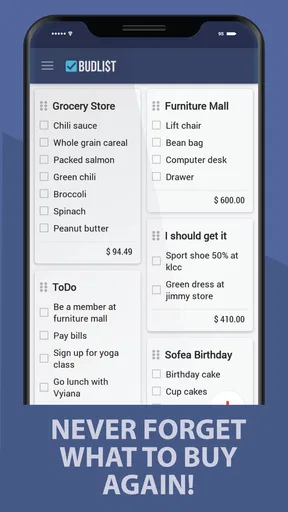
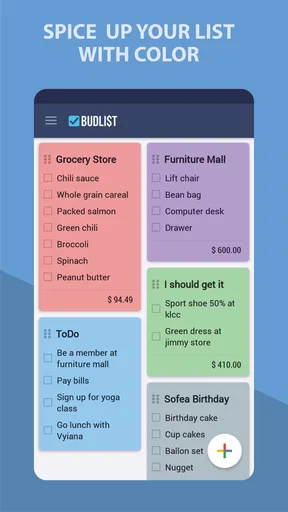
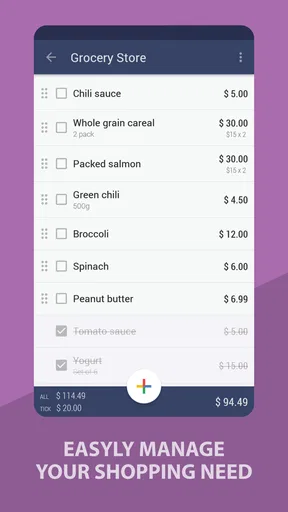
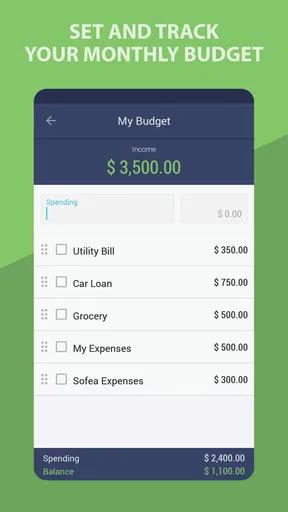
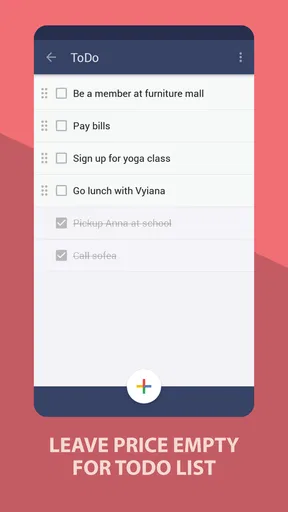
Our Review of Grocery Shopping List -BudList
 Analysis by Appyee
I keep coming back to grocery lists for a simple reason: the useful part isn’t making one, it’s having the right items with me when I reach the shop. Grocery Shopping List - BudList aims to make that routine easier by putting shopping notes in a dedicated app instead of leaving them scattered across scraps of paper or a general notes app. Its appeal is easy to understand during the first few trips; the more interesting test is whether keeping the list current feels easy enough to become a habit.
Why the first few trips feel easier
BudList is a free shopping app from RMY Studio, and its focus is refreshingly narrow: making lists for grocery runs and other shopping needs. The app has a 4.4 average from around 880 ratings, with over 10,000 installs. It is rated Teen, and its current version is 3.30. Those details give a sense of an established, modest-sized app, but the deciding question for me is whether its everyday workflow suits the way you shop.
The quick win is having one place to collect what you need before you leave home. A grocery item can be added as soon as you notice it is running low, rather than relying on memory later. That small change is particularly useful for shared households: one person can think of an ingredient in the kitchen, while the person doing the shopping can check the same list instead of interpreting a message thread.
There is also a practical difference between a list you can glance at and a note you have to keep editing. In the aisle, tapping an item off the list makes it clear what remains. I like that this turns the phone into a simple progress tracker, rather than asking me to remember which things I already put in the basket. For a short, familiar shop, that is often all the structure I need.
What is Grocery Shopping List - BudList?
Alright, let’s get down to the basics. BudList is your digital grocery list, neatly packed into an app available on both Android and iOS. The app promises to help you organize your shopping trips, save time, and avoid the dreaded "I forgot the milk" moments. But does it live up to the hype? Let’s see.
Setting Up and Getting Started
First things first, downloading and setting up the app is a breeze. Simply head over to your app store, hit download, and you’re good to go. The interface is clean and user-friendly, which is a win in my book. No one likes wasting time figuring out how to use a new app, right?
Once you fire it up, you’ll be prompted to create a new list. This is where the magic begins. You can type in items manually or use the voice input feature, which I found surprisingly accurate. Just say "eggs, bread, cheese" and boom, they’re on your list.
Features That Stand Out
One feature that caught my attention was the sharing option. Got a partner or roommate you share shopping duties with? You can easily share your list with them. This way, no one ends up buying the same things twice (unless you really love bananas or something).
There’s also the ability to categorize items. You can sort your list by aisle, which is a lifesaver when you're navigating a crowded supermarket. Plus, the app allows you to store your regular lists, so your weekly grocery haul is just a click away.
To get more out of those saved lists, I’d treat them as starting points, not permanent inventories. Before a routine shop, scan the list and remove what is still in the cupboard; then add the one-off ingredients for that week. This avoids a common trap with reusable lists: carrying yesterday’s needs into today’s trip and buying duplicates because the list looks authoritative.
Categories are most useful when they match how you actually move through your regular store. If your shop is small or you shop in a different place each week, a strict aisle order can become more work than help. I would begin with a few broad groupings and only sort more carefully if it saves steps in a store you know well. The point is to reduce backtracking, not to maintain a perfect map.
Keeping the routine useful after the novelty fades
The best way to make a list app last is to give it a predictable job. I’d use BudList as the household’s shared “buy this” place, not as a general notebook for meal plans, reminders, and every errand. That boundary makes it easier to scan before leaving and reduces the chance that a grocery item gets buried among unrelated notes.
A realistic example: after dinner, I notice we are nearly out of coffee and add it while I am still in the kitchen. The next day, my housemate is already passing the shop, so they can check the shared list and pick it up without asking which brand or whether we still need it. For less obvious items, a short clarifying note can prevent a second trip, but I would keep descriptions brief so the list remains readable at a glance.
Voice input can be handy when your hands are occupied, such as while unpacking groceries or preparing food. I would still glance over the result before relying on it for a full shop, especially for unfamiliar product names or items that sound alike. A quick correction at home is less frustrating than trying to work out what a misheard entry meant in a busy aisle.
BudList also sits in a useful middle ground between a paper list and a full grocery-service app. Paper is faster for someone who wants to jot down a few things and does not need shared access, while a notes app may be a better fit if shopping is only one part of a broader personal checklist. BudList makes more sense when recurring grocery lists, categories, and sharing are central to the task. It is not a substitute for ordering groceries or comparing products; its value is keeping the plan in view while you shop.
In Use: A Day at the Grocery Store
So how does it perform in real life? Pretty darn well, if you ask me. I took it for a spin on my weekly grocery run. The app synced flawlessly with my phone, and the interface was intuitive enough that I didn’t look like a lost puppy trying to figure it out.
Checking items off the list is as satisfying as popping bubble wrap. A simple tap and the item is marked, with a satisfying little animation. It’s those small joys that make the experience a little more fun.
For a busy trip, I would build the list before arriving rather than composing it while walking through the shop. That is less about the app and more about keeping attention on the task: add planned items at home, then use the store visit for checking and ticking off. If several people are contributing, agree on the list as the source of truth; otherwise, a text message sent at the last minute can compete with what is already recorded.
One useful trade-off is that a compact list encourages quick decisions, but it does not automatically solve the question of quantity. If “tomatoes” could mean one or a whole bag, make the amount clear when adding it. The same goes for a particular variety or size. A little precision before the trip can save a follow-up call, especially when somebody else is shopping.
Where the friction can show up
Now, not everything is sunshine and rainbows. While the app is fantastic, I noticed a few hiccups. For instance, the syncing feature, while generally reliable, had a slight lag on a couple of occasions. Also, the voice input, though mostly accurate, stumbled a bit with less common words. But hey, nobody’s perfect, right?
That syncing delay matters most when two people are changing the list around the same time. I would avoid treating a just-added item as instantly visible on another person’s phone; if a purchase is urgent, a quick check-in can be the safer option. For ordinary planning, the occasional pause may be tolerable, but people who need real-time coordination for every change may prefer a tool they already know updates consistently for them.
There is a maintenance cost, even with a simple list. Saved lists are helpful only if someone reviews them, and shared lists work best when everyone removes items after buying them. If one person regularly tidies the list while others only add to it, the app can quietly become a source of uncertainty. I would agree on a basic household habit: add items when they run low, tick them off when purchased, and check leftovers before starting the next routine list.
BudList is free to download, though it includes in-app purchases priced at $3.49 per item. That makes it easy to try the basic idea without committing money upfront, but I would check which optional purchase, if any, fits your needs before paying. If all you want is a short list for occasional errands, there may be no reason to spend extra; if you use the app often, judge any purchase by whether it removes a real point of friction rather than by the promise of more convenience.
It may also be the wrong choice for a shopper who wants recipes, automatic product suggestions, price tracking, or grocery delivery in one place. I would not choose a list-focused app expecting it to plan meals or handle the purchase itself. Likewise, if you strongly prefer a list that works entirely on paper or already have a shared notes system everyone reliably checks, switching tools could add a chore rather than remove one.
Final Thoughts
So, would I recommend Grocery Shopping List - BudList? Absolutely. It’s a handy little tool that’s bound to make your grocery shopping more efficient and maybe even a tad more enjoyable. The ease of use, coupled with the practical features, makes it a worthy addition to your app arsenal.
Whether you’re a busy parent, a college student, or just someone who likes to stay organized, BudList has got your back. So, give it a shot, and say goodbye to forgotten groceries and hello to smoother shopping trips.
Ready to try it out? Head over to your app store and get started on your journey to hassle-free grocery shopping.
For me, its lasting value depends less on a clever first impression than on whether adding an item becomes as natural as noticing it is low. If you shop regularly, share errands, and like having repeat lists ready to adjust, that habit can make BudList a dependable helper. If you only need an occasional reminder, a scrap of paper may still be simpler. I would try it for a normal shopping cycle, keep the list honest, and see whether it saves enough mental effort to earn a permanent place on your phone.
Verdict
Strengths of Grocery Shopping List -BudList
- User-friendly interface for quick list creation.
- Syncs across devices for shared shopping.
- Barcode scanning for easy item addition.
- Customizable categories for better organization.
- Offline access to lists when needed.
Limitations of Grocery Shopping List -BudList
- Limited integration with major grocery stores.
- Occasional sync issues between devices.
- No price comparison feature included.
- Ads can be intrusive in the free version.
- Lacks advanced nutritional information.
Similar Picks in This Category
View All
SHEIN-Shopping Online
Roadget Business PTE. LTD.4.8

Amazon Shopping
Amazon Mobile LLC4.4


Mercado Libre: Compras online
Mercado Libre4.8

Wish: Shop and Save
Wish US Holdings LLC4.7

Alibaba.com - B2B marketplace
Alibaba Mobile4.4
Frequently Asked Questions
What is Grocery Shopping List - BudList and how does it work?
Grocery Shopping List - BudList is a mobile application designed to streamline your grocery shopping experience. It allows users to create, manage, and share shopping lists easily. You can add items manually or through voice commands, categorize products, and even set reminders for recurring purchases. The app aims to save time and reduce stress at the store.
Is Grocery Shopping List - BudList free to use, or are there in-app purchases?
Grocery Shopping List - BudList is free to download and use, offering basic features for creating and managing lists. However, it may include optional in-app purchases or subscriptions to unlock premium features such as ad-free experience, advanced sharing options, or integration with other apps and services. Check the app store listing for detailed pricing information.
How does Grocery Shopping List - BudList help in organizing my shopping?
The app provides a user-friendly interface for organizing your shopping lists by categories such as fruits, vegetables, dairy, etc. It also allows you to set priorities and quantities for each item. Additionally, the app can track previous purchases and suggest items based on your shopping habits, ensuring you don’t forget anything while shopping.
Can I share my grocery lists with others using BudList?
Yes, Grocery Shopping List - BudList enables users to share their lists with family or friends. You can send lists via email, text, or directly within the app if both parties have it installed. This feature is great for coordinating group shopping trips or ensuring everyone in the household has input on what’s needed.
Does the app work offline, or do I need an internet connection?
Grocery Shopping List - BudList is designed to work both online and offline. You can create and manage your lists without an internet connection, which is convenient when shopping in areas with poor reception. However, some features like syncing across devices or sharing lists may require an internet connection to function properly.
